
Remote Access Pricing Plans Explained: Selecting the Best Fit
When it comes to remote access software, different teams call for different functionality levels. Some companies look for stability and affordability while others value scalability. Getscreen.me offers several pricing options designed for both personal and business use.
In this guide, we will explore the differences between different remote access pricing plans, what features they include, and which option works best depending on the team size, support goals, and infrastructure requirements.
Free Version
A Free Version is a good starting point or a platform’s test-drive. You can try our remote access app in action. What’s more, it works for users who occasionally access devices remotely.
Generally, other remote support programs provide short free trials with strict limitations. Getscreen.me offers an unlimited free plan without time pressure or mandatory subscription upgrades.
Works best for: Individual users, freelancers, personal remote access, testing the platform before purchasing, small occasional support tasks.
A free plan includes the basic remote access functionality enough to access devices via a browser. Users can explore the interface and connection process. It helps them decide whether the platform matches their workflow.
Although free, the system delivers the core experience of browser-based remote access without requiring complicated setup procedures with:
- up to 2 remote devices to access forever;
- up to 50 MB per file;
- unlimited session duration time.
For businesses, the free plan acts as a safe testing environment before deploying the service across multiple employees or departments.
Paid Business Plans
Unlike individuals, companies need more advanced remote access features. As teams grow, support workflows become more complex. More devices require maintenance, technicians need shared access, and companies often look for stronger administration and security controls.
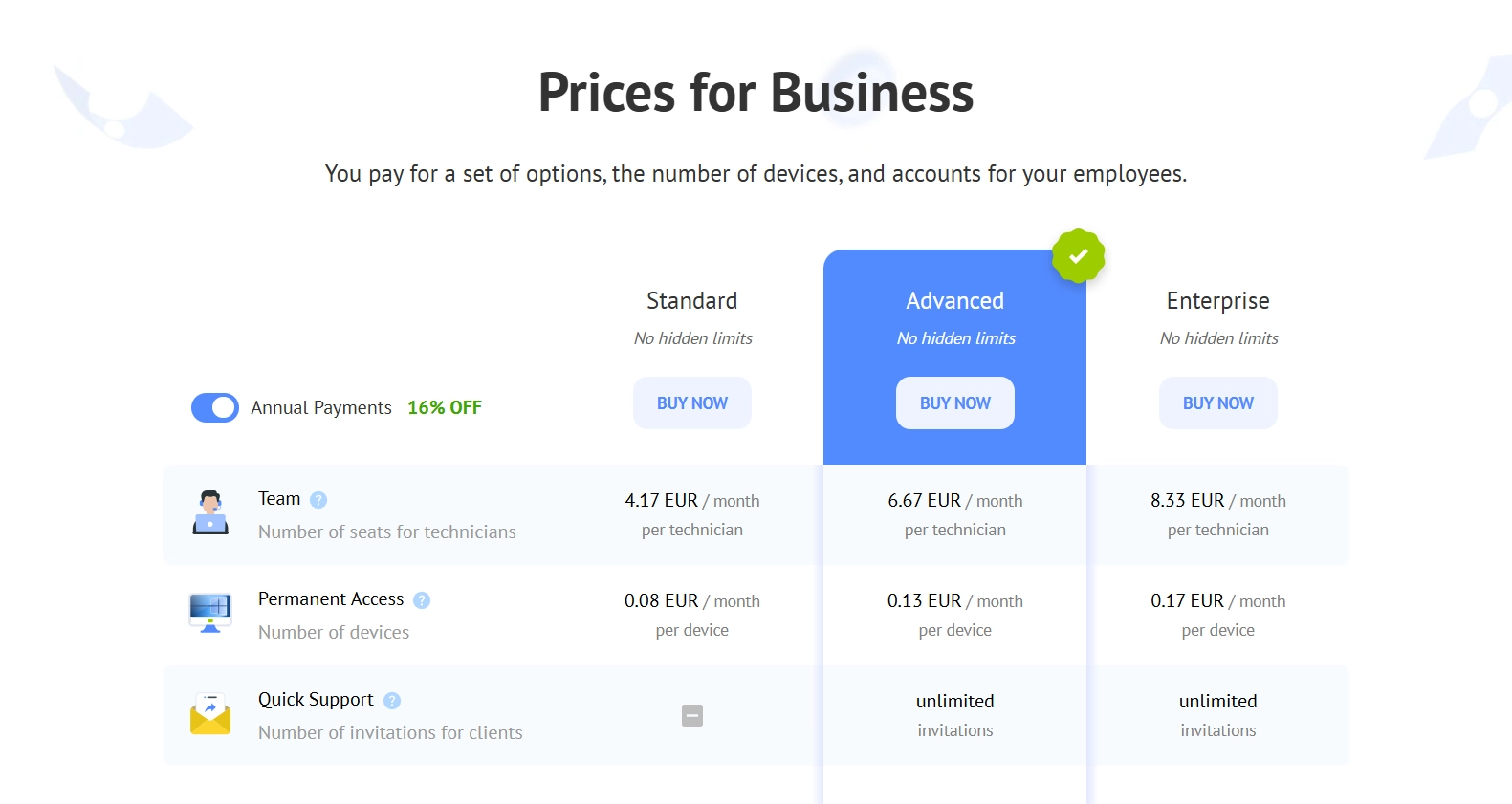
Getscreen.me addresses these needs with three business plans including:
- Standard;
- Advanced;
- Enterprise.
Each plan targets a different stage of business growth. Small teams can start with basic professional tools, while large enterprises may benefit from advanced infrastructure management and customization capabilities.
Let’s have a closer look at each plan.
Standard Plan
The Standard plan is a practical choice for individual specialists, startups, and small support teams. It covers the essential tools required for everyday remote support without unnecessary complexity.
A small company with several employees can use this plan to maintain office computers, provide technical assistance, and organize unattended remote access through a browser. Freelance IT specialists may also find it suitable for supporting clients remotely.
Main features include:
- Stable remote access;
- Browser-based connections;
- Device management;
- Unattended access;
- File transfer;
- Multi-platform support.
The plan helps small companies build a professional remote support workflow without enterprise-level expenses.
Works best for: Individual IT specialists, small support teams, startups, small businesses, companies with a limited number of remote devices.
Advanced Plan
As businesses grow, remote support becomes more complex. Multiple technicians may need simultaneous access to devices. Companies also require stronger monitoring and management features.
The Advanced plan expands the capabilities available in the Standard version and provides better scalability for larger support operations.
Teams can benefit from:
- Expanded technician management;
- Improved administration controls;
- More flexible device organization;
- Advanced support workflows;
- Better scalability for growing infrastructures.
Companies that actively support remote employees or large client bases usually choose this plan because it balances functionality and pricing very effectively.
Works best for: Scaling businesses, internal IT departments, MSPs, companies with distributed teams, organizations requiring advanced management tools.
Enterprise Plan
The Enterprise plan is designed for organizations with large infrastructures, strict security policies, and advanced operational requirements. Big companies require custom deployment scenarios, centralized infrastructure management, internal compliance controls, and advanced security policies.
Organizations in finance, healthcare, government, and large corporate environments often choose this plan because it allows greater control over infrastructure and administration.
Enterprise-level benefits include:
- Advanced security management;
- Enterprise-grade administration;
- Custom deployment options;
- Large-scale device management;
- Priority support;
- Flexible infrastructure scaling.
For companies operating hundreds or thousands of remote devices, this plan provides the scalability and administrative control required for stable long-term operations.
Works best for: Large enterprises, corporations, financial organizations, healthcare providers, government structures, companies with extensive IT departments.
Business Plans Comparison Table
| Plan | Best for | Team Size | Remote Devices | Focus on |
|---|---|---|---|---|
| Standard | Small businesses and individual specialists | 1–5 technicians | Small infrastructure | Basic professional |
| Advanced | Growing businesses and MSPs | Medium teams | Medium to large infrastructure | Scalability and team management |
| Enterprise | Large organizations | Large IT departments | Large-scale infrastructure | Security, customization, and control |
The right plan depends mostly on:
- Number of technicians;
- Number of remote devices;
- Security requirements;
- Internal management complexity;
- Growth expectations.
Small teams can scale as they grow starting with Standard, than moving to Advanced. Large organizations typically choose Enterprise because of security and infrastructure flexibility.
Self-Hosted Version
The Self-Hosted Version offers the most flexibility. Companies can take full control over their infrastructure and data.
The standard cloud version of Getscreen.me stores and processes data through Getscreen.me infrastructure. This approach works well for most companies because it reduces deployment complexity and maintenance costs.
The self-hosted version works differently. Businesses install remote access software inside their own infrastructure. All data, sessions, and management systems remain under internal control. This model is especially important for organizations with strict compliance requirements or internal security policies.
Main advantages include:
- Full infrastructure ownership;
- Internal data storage;
- Higher customization flexibility;
- Advanced security control;
- Independent deployment architecture;
- Integration with internal systems.
Getscreen.me provides the self-hosted solution as ready-to-deploy software. Businesses receive an out-of-the-box product that can be adapted to their operational requirements.
Works best for: Large enterprises and companies with internal compliance standards as well as teams requiring private infrastructure.
Personal Lifetime Plan
The Personal Lifetime Plan targets users who seek long-term personal remote access without recurring monthly payments. Instead of paying for subscriptions, users make a one-time purchase and receive lifetime access to the plan features.
Typical use cases include:
- Accessing a home computer while traveling;
- Managing personal workstations remotely;
- Helping family members with technical issues;
- Freelance support sessions.
The plan combines affordability with long-term convenience. For users who do not require business-scale functionality, the lifetime model may become more economical than recurring subscriptions over time.
Works best for: Home users, freelancers, independent specialists, personal device management, long-term individual usage.
Special Offers and Paid Options
We constantly provide sales and discounts. Users can explore available offers and select a suitable campaign.
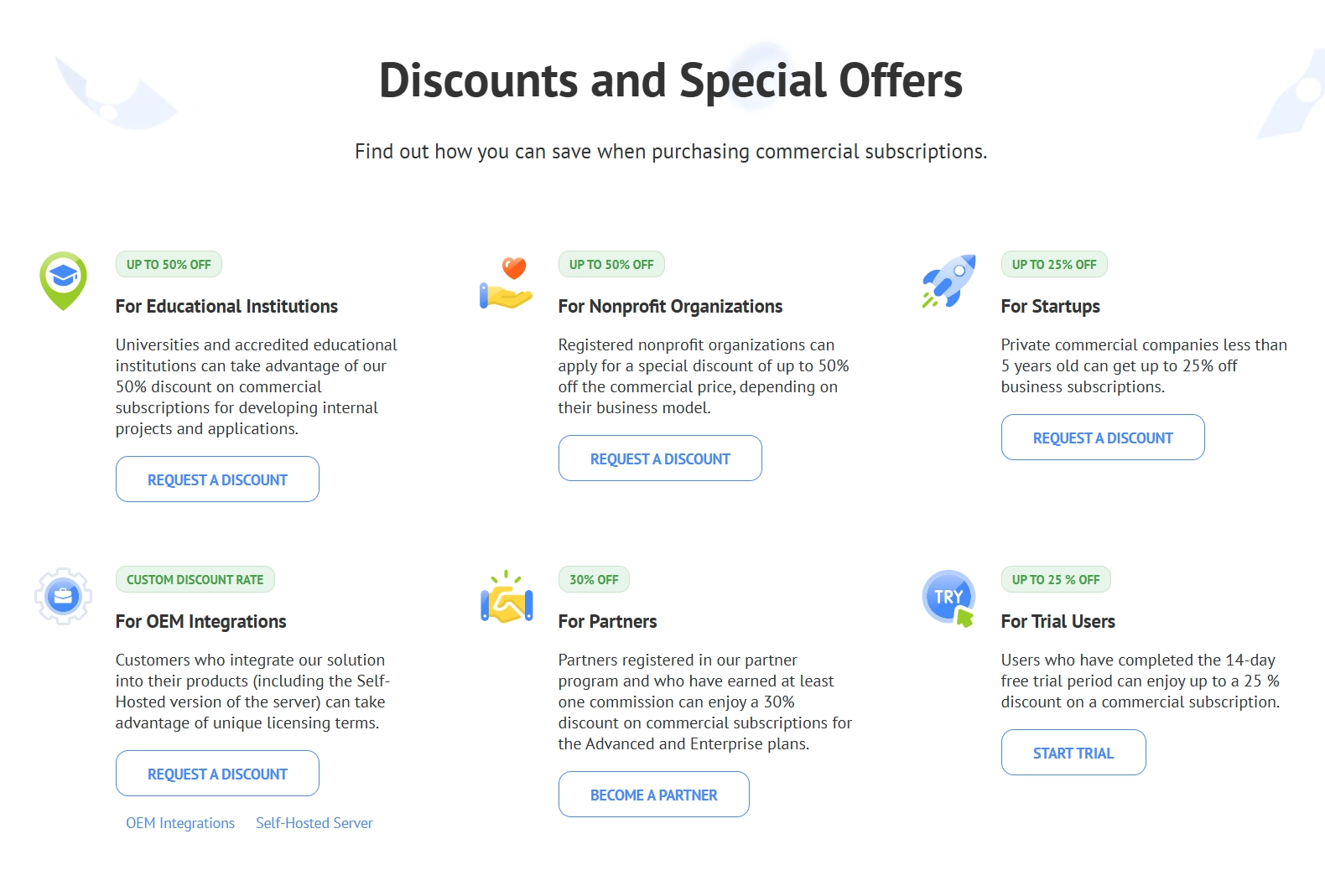
Additionally, Getscreen.me delivers additional options that help businesses customize their subscription according to operational needs. They include extra remote devices, additional technicians, expanded session capabilities, extra infrastructure resources, flexible scaling adjustments
Businesses do not need to overpay for unnecessary functionality while still expanding their remote support environment when needed. Flexible options simplify long-term budgeting because businesses can gradually expand their subscription alongside operational growth.
For example: A small team may only need extra devices. A growing MSP may require more technician accounts. Large organizations may need infrastructure scaling.
Check Your Remote Access Price
If you struggle to estimate the exact cost of remote support infrastructure, use our Price Calculator.
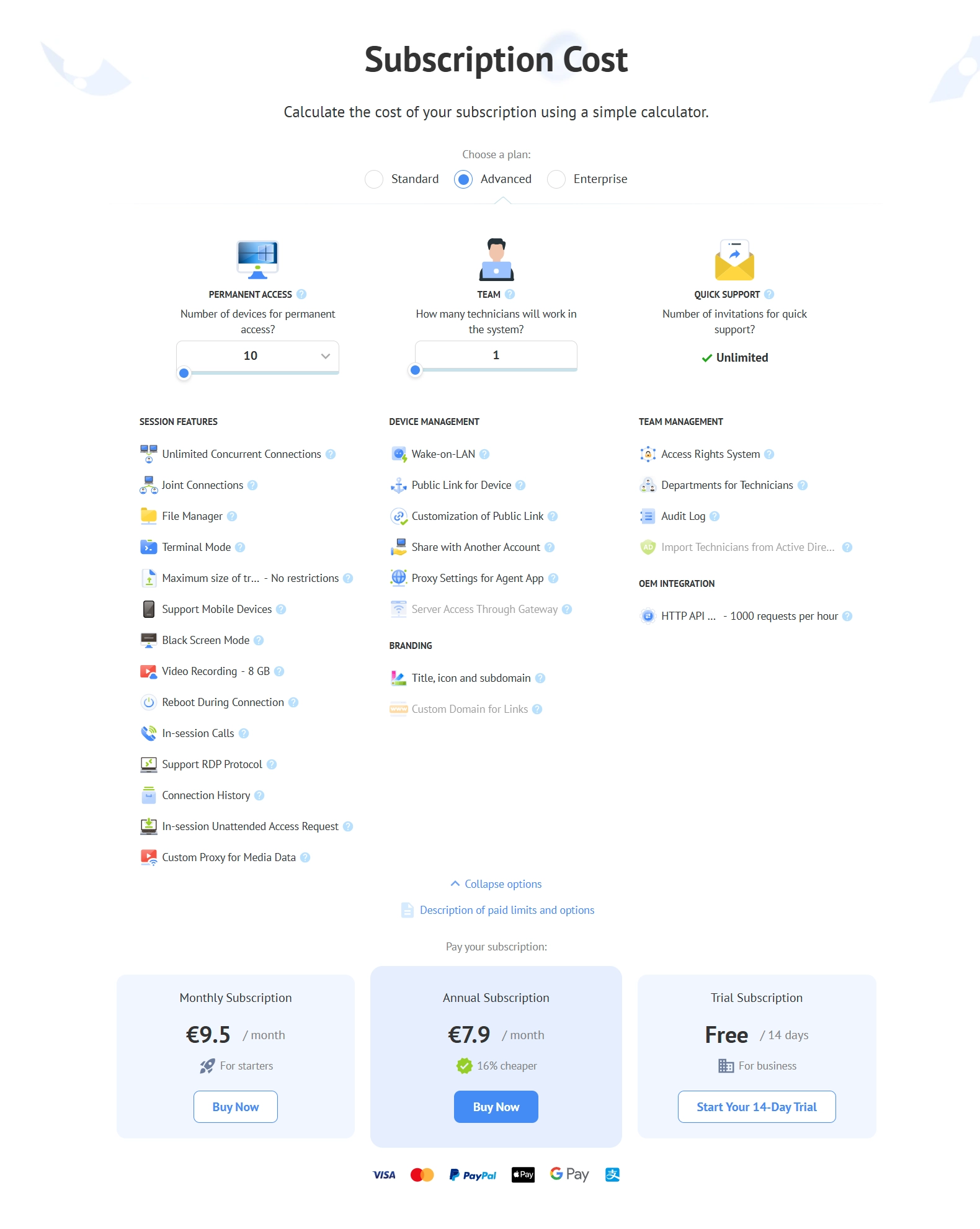
It helps you calculate pricing depending on:
- Number of technicians;
- Number of remote devices;
- Required functionality;
- Infrastructure size.
The Bottom Line
Getscreen.me offers flexible pricing plans for both personal users and businesses of different sizes. The Free Version works well for testing the platform and occasional personal usage. Standard and Advanced plans suit small and growing teams, while Enterprise supports large organizations with complex infrastructure requirements.
The Self-Hosted solution gives businesses full infrastructure control, and the Personal Lifetime plan provides a convenient long-term option for individual users.
Additional options, discounts, and flexible scaling allow companies to adapt the platform to their operational needs. Teams can use the pricing calculator to quickly find the most suitable configuration.