
Why Enterprise Businesses Need Remote Access
As businesses grow, providing reliable IT support becomes increasingly difficult. Employees work across offices, countries, and time zones, while the number and variety of devices that technical teams need to manage remotely continue to increase. When a technician cannot physically access a device, remote access software becomes an essential part of keeping employees productive and resolving technical issues quickly.
For enterprise organizations remote desktop software helps to manage large numbers of technicians and devices, control who can access what, deploy agents across entire device fleets, integrate remote support with existing identity systems, and maintain visibility over remote sessions.
Getscreen.me gives the tools to organize teams, manage access permissions, deploy agents at scale, integrate with existing infrastructure, automate remote access workflows, and keep control over their environment as the organization grows.
Let’s see how Getscreen.me can fit into the day-to-day operations of an enterprise and help technicians provide faster, more controlled remote support.
Team Management and Granular Access Control
An enterprise is a complex ecosystem of different offices, departments, device groups, or types of users. Getscreen.me lets organizations structure their remote support teams into groups and assign roles and permissions based on each technician's responsibilities.
How it works
Administrators can create departments, add technicians to multiple departments, and assign access through the organizational structure instead of configuring every user individually.
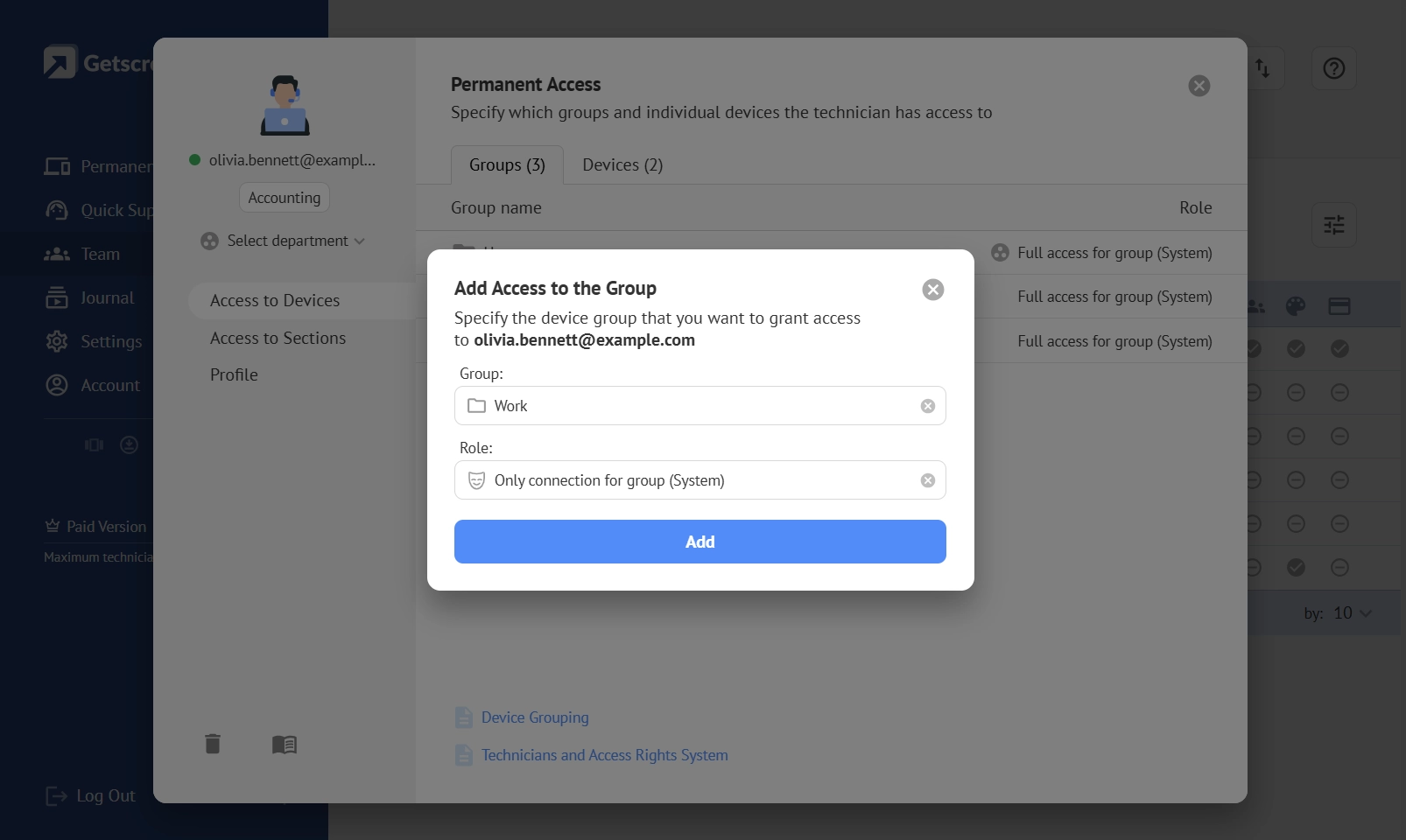
Also, our remote access app supports system and custom roles with granular permissions. This allows an organization to decide whether a technician can:
- view or control a screen;
- transfer files;
- use Terminal Mode;
- reboot a device;
- access connection history;
- manage devices or perform administrative tasks.
Permissions can also be assigned to individual devices or groups of devices and inherited through departments.
How enterprises can use it
Consider a company with several regional IT teams. Technicians in the European support department may need full access to devices in European offices, while a help desk team may only need screen viewing and control.
A smaller group of senior administrators can retain broader permissions for device management, auditing, and team administration.
Team Work
Organizations can scale their IT teams without turning access management into a manual process. Technicians get the tools they need for their roles, while the company maintains tighter control over sensitive devices and administrative functions.
Cross-Platform Support
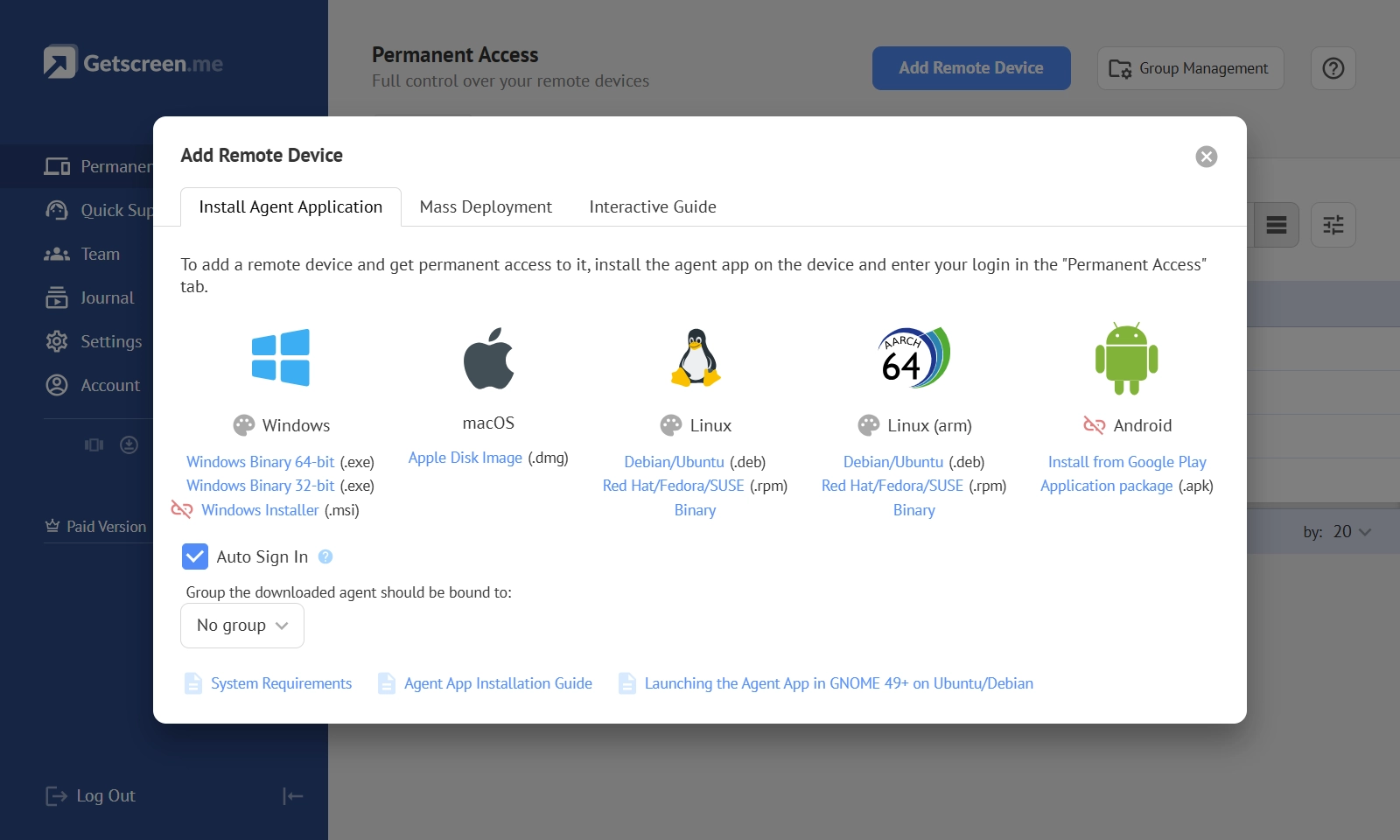
Enterprise IT environments often include devices running different operating systems. Getscreen.me supports remote access to Windows 10 and later, macOS Big Sur and later, and Linux distributions including Ubuntu, Fedora, and Debian. Technicians can manage these devices through the Getscreen.me application or connect to them directly from a web browser.
How it works
The Getscreen.me agent is available for Windows, macOS, and Linux, allowing organizations to deploy remote access across a mixed device fleet. Technicians can then open connection windows from their Getscreen.me account in a supported browser, without needing to use the same operating system as the remote device.
How enterprises can use it
For example, a technician working on Windows can connect to a Mac used by a designer or a Linux workstation used by a developer from the same Getscreen.me dashboard.
This gives the support team a consistent way to work across different platforms without maintaining separate remote access solutions.
Cross-Platform Support
For enterprises, this reduces the number of tools IT teams need to maintain and makes remote support easier to standardize. It also gives organizations more flexibility when choosing devices and operating systems without creating separate support workflows for each platform.
Mass Deployment
Deploying remote access software manually is tough. An organization may have hundreds or thousands of devices. Getscreen.me supports mass deployment of its agent, allowing organizations to establish a large number of remote connections using existing IT management tools.
How it works
Getscreen.me agents can be deployed automatically through RMM or MDM systems. For Windows environments, organizations can also use Group Policy (GPO), while console commands are available for agent installation across supported operating systems.
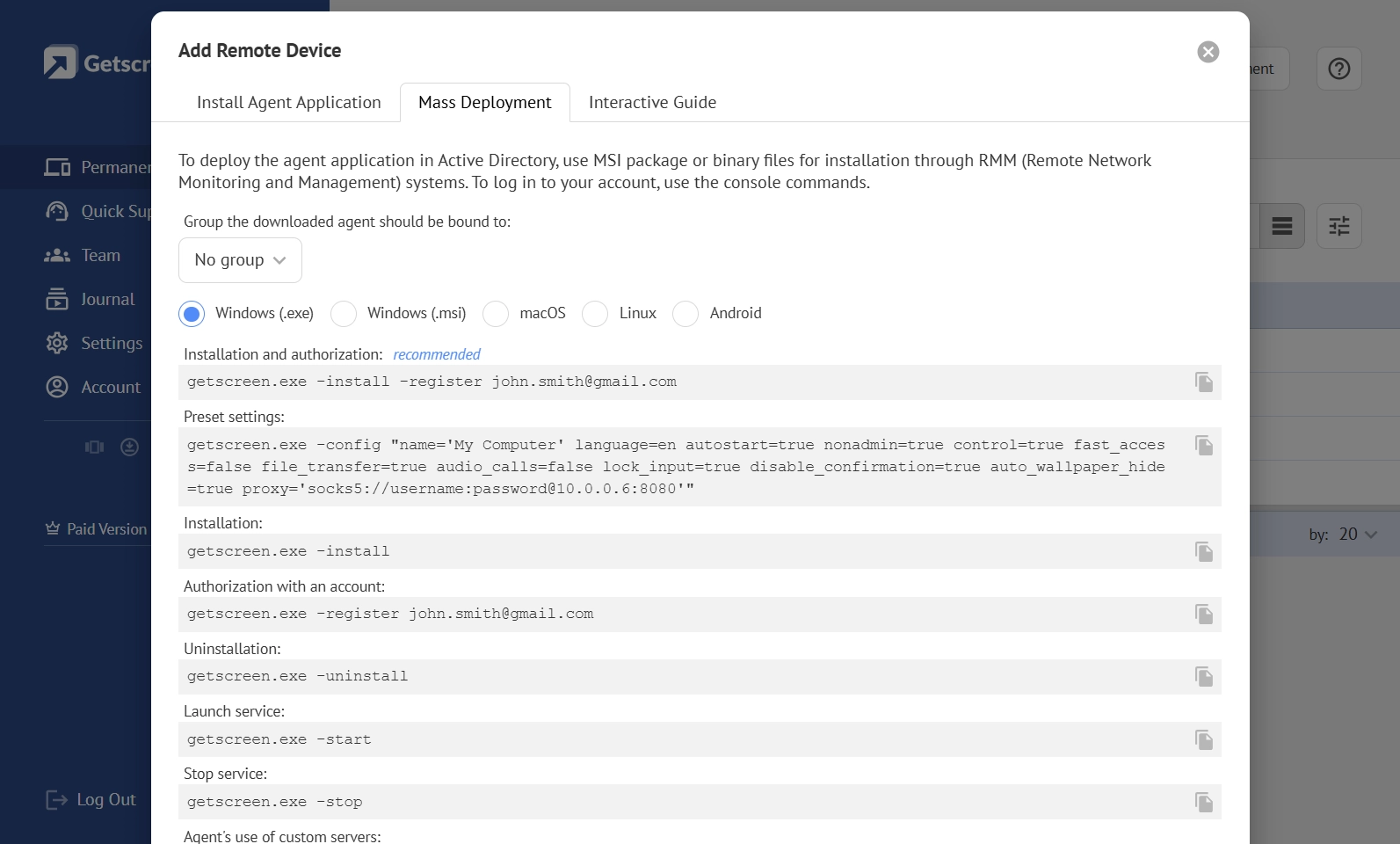
This allows IT administrators to integrate Getscreen.me deployment into existing device management processes instead of installing the agent on every computer individually.
How enterprises can use it
Consider an enterprise with hundreds of Windows workstations distributed across several offices.
Instead of asking technicians to install the Getscreen.me agent manually on each device, administrators can deploy it through Group Policy and make the devices available to the appropriate IT teams.
Consistency
Mass deployment helps enterprises roll out remote access consistently across large device fleets while reducing the workload for IT administrators. It also makes it easier to standardize remote support as the organization adds new devices, offices, or employees.
Active Directory Integration
Big teams usually manage employee and administrator accounts through Active Directory. Getscreen.me can integrate via LDAP, allowing organizations to import existing users and let them sign in to the app with the same usernames and passwords they already use.
How it works
Every time a local network connects Getscreen.me with the Active Directory server, a gateway is installed. It retrieves users from selected AD security groups and synchronizes them with the corresponding departments in Getscreen.me.
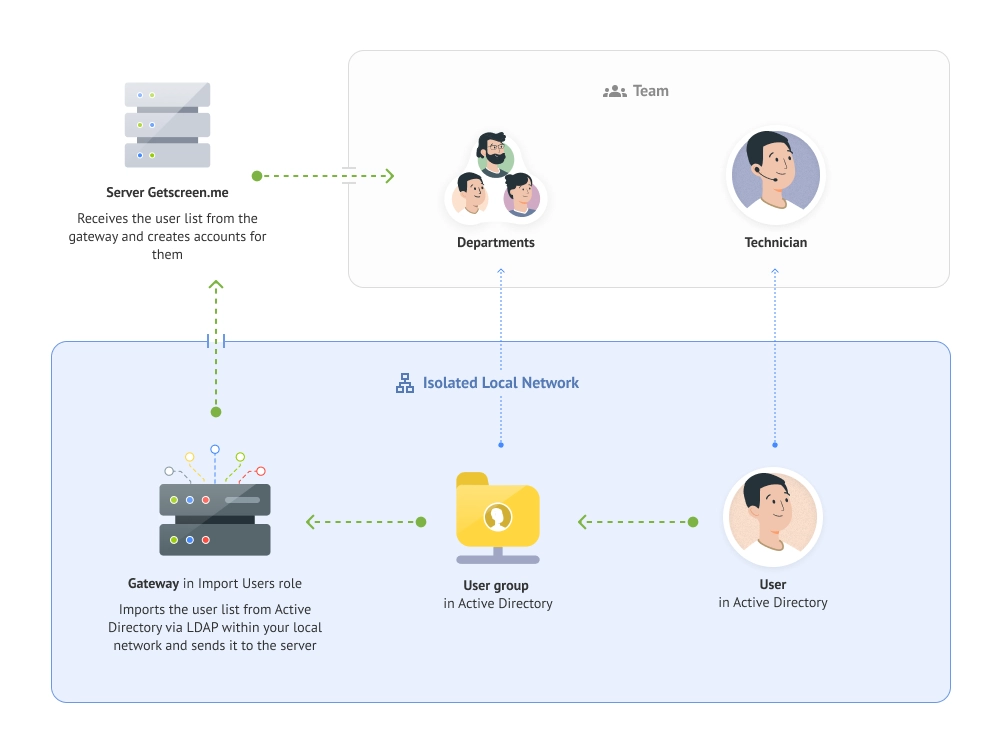
Administrators can link an Active Directory group to a Getscreen.me department, so imported users automatically become members of that department and inherit its configured permissions.
User synchronization runs automatically at a configured frequency, keeping the Getscreen.me team structure aligned with changes made in Active Directory.
How enterprises can use it
Consider an enterprise with separate Active Directory groups for regional IT teams and help desk specialists.
Administrators can link these groups to corresponding Getscreen.me departments, import automatically, and receive the appropriate access without creating and managing their accounts manually.
Administration
Integration with an existing directory simplifies user administration and reduces duplicate account management for enterprise IT teams. It also helps organizations keep remote access aligned with their established identity structure and access policies as teams and responsibilities change.
HTTP API
Large organizations often rely on internal systems and automated workflows to manage their IT infrastructure. Getscreen.me provides an HTTP API that allows companies to integrate remote access and device management capabilities into their own applications, services, and internal systems.
How it works
The RESTful API provides programmatic access to devices, connections, users, and other Getscreen.me entities. Organizations can use API requests over HTTPS, authenticated with an API key, to automate actions that would otherwise require administrators to work through the control panel.
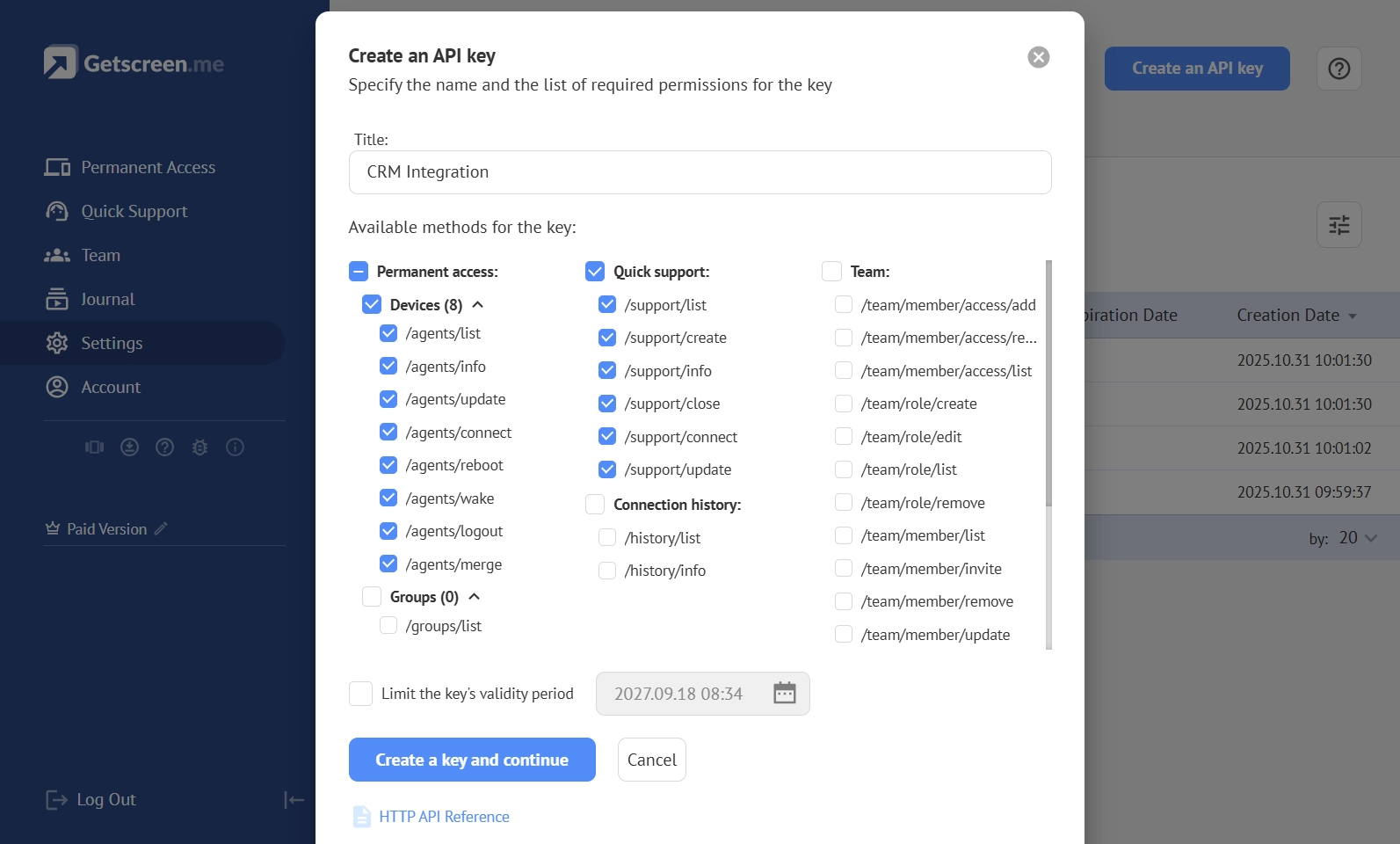
This makes it possible to connect Getscreen.me with existing IT management platforms and build custom workflows around remote access and device management.
How enterprises can use it
Consider an enterprise that uses an internal IT service management system to handle employee support requests.
When a ticket requires remote assistance, an integration can use the Getscreen.me API to automate relevant actions and connect remote access capabilities with the company's existing support workflow.
Automated Integration
API integration allows enterprises to adapt remote access to their existing IT processes instead of forcing teams to change established workflows. It can reduce manual administrative work, support automation at scale, and make Getscreen.me part of a broader enterprise IT ecosystem.
Self-Hosted Version
Some enterprises cannot rely on a cloud-only remote access solution. They may need to keep connection management and data within their own infrastructure, operate in isolated networks, or meet strict internal security and compliance requirements.
Getscreen.me has a Self-Hosted version that allows organizations to deploy the remote desktop software within their own infrastructure and maintain control over the entire environment.
How it works
With the Self-Hosted version, the organization deploys the Getscreen.me server and supporting components on its own infrastructure. User accounts, device management, connection coordination, data storage, and traffic routing can remain within the company's network, including isolated environments without public Internet access.
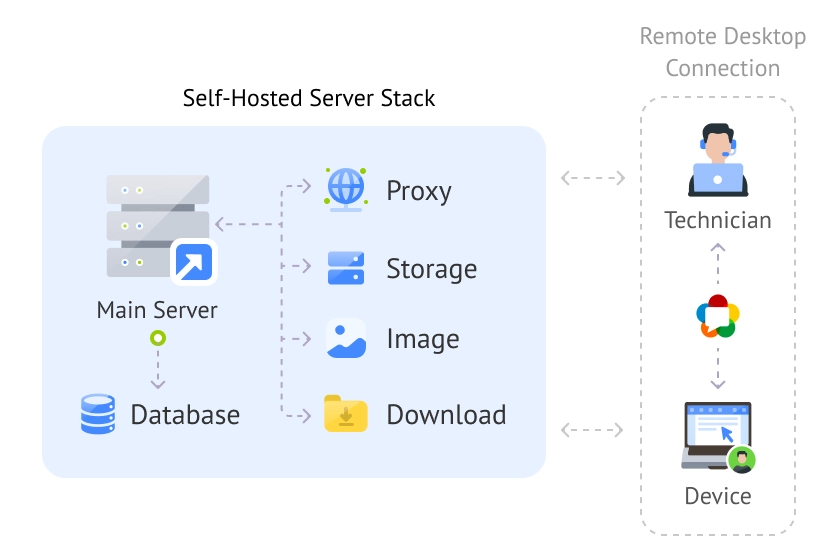
The deployment also gives administrators greater control over the technical environment. They can:
- configure network ports and TLS encryption;
- use IP whitelisting and multi-factor authentication;
- apply HSTS and Content Security Policy (CSP);
- configure password expiration and browser restrictions;
- deploy proxy servers to optimize connection routing and performance;
- integrate remote access with internal systems through HTTP API and iFrame.
How enterprises can use it
Consider a financial institution, government organization, or critical infrastructure operator that cannot allow remote access traffic or sensitive connection data to leave its controlled infrastructure.
With Getscreen.me Self-Hosted version, the organization can deploy the platform inside its own network, integrate it with existing systems, and configure the environment according to its security and operational requirements.
Safety and Control
Self-hosting gives enterprises greater control over infrastructure, data, security, and network architecture. It is particularly valuable for organizations with strict compliance requirements, isolated environments, or complex network architectures where a standard cloud deployment may not provide the necessary level of control.
The Bottom Line
IT teams need to manage people, devices, permissions, and infrastructure at scale while keeping remote operations secure and predictable.
Getscreen.me brings these requirements together in one platform:
- Organized teams to manage technicians through departments, roles, and granular permissions.
- Diverse environments to support Windows, macOS, and Linux devices from the same platform.
- Deployment at scale to roll out agents across large device fleets using RMM, MDM, or Group Policy.
- Existing identity infrastructure to connect Active Directory groups and synchronize users automatically.
- IT automation to integrate remote access and device management into internal systems through HTTP API.
- Infrastructure control to deploy the Self-Hosted version when security, compliance, or network requirements demand full control.
Enterprises can create a scalable remote access environment. Whether the priority is simplifying IT operations, integrating existing infrastructure, or keeping sensitive systems under the company's control, Getscreen.me provides the flexibility to build remote support based on business needs.