How Getscreen.me Helped an Asia-Pacific Online School Streamline Remote IT Support
As online education became increasingly popular across Asia-Pacific, one growing EdTech company found itself facing a new challenge. Its student base was expanding faster than its IT support operations could keep up.
The more courses the school launched, the more students they attracted. It also meant more tutors, more software environments, and more devices requiring technical assistance. What once worked for a small team of IT specialists became increasingly difficult as the school began supporting learners and employees across several countries and time zones.
With the help of Getscreen.me, the online school standardized remote support and created a fast, secure way to troubleshoot devices used by both its distributed workforce and students.
Privacy
As we value our clients' privacy and due to the Non-Disclosure Agreement with the company, we cannot reveal the legal business name. Therefore, this use case is anonymous.
About the Company
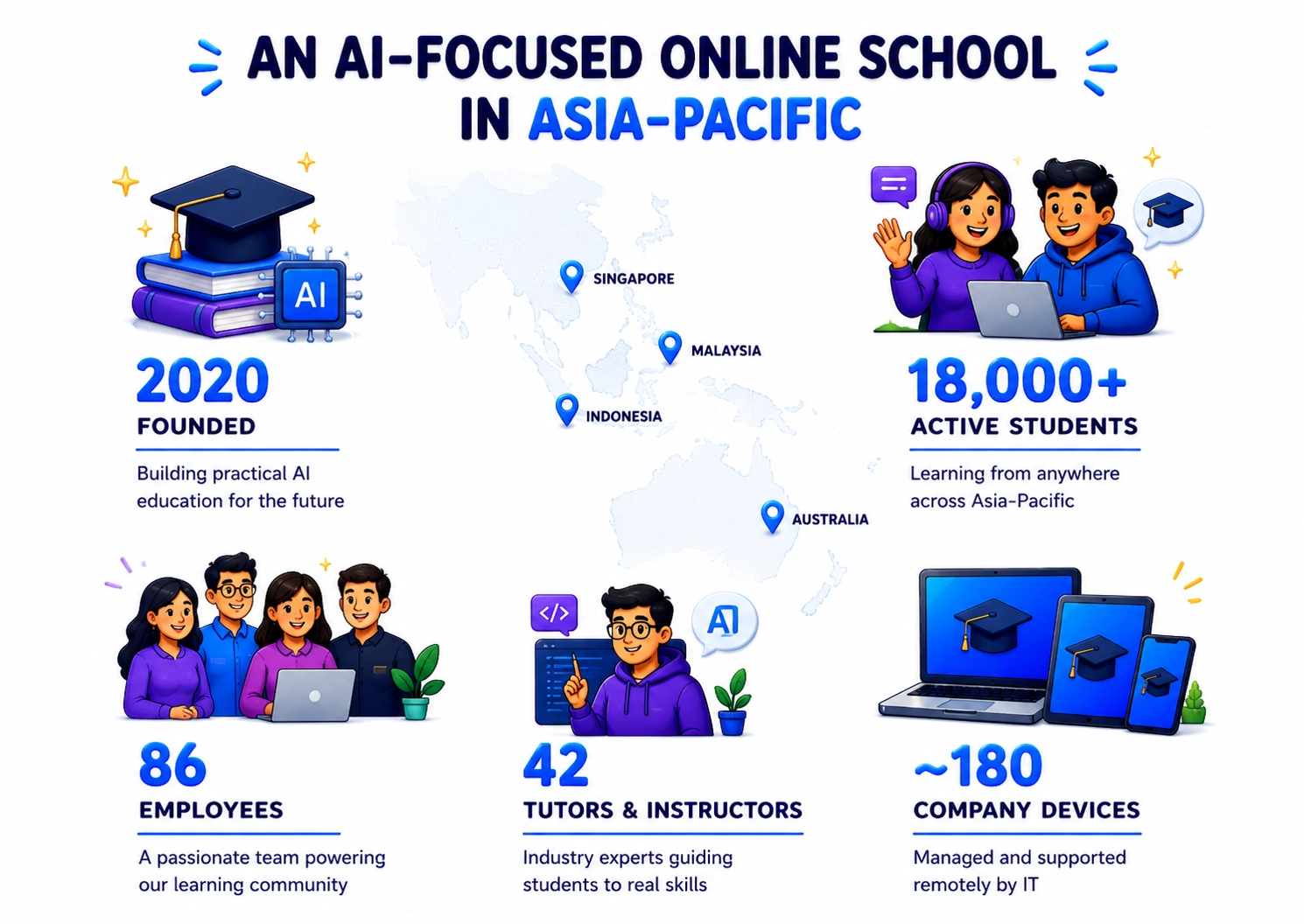
The school was established in 2020 by a group of AI and software engineering professionals who wanted to make practical AI education accessible to a wider audience.
Today, it has 86 employees, including 42 instructors and tutors, and serves more than 18,000 active students. Its learners are based primarily in Singapore, Australia, Malaysia, and Indonesia.
The school offers courses covering artificial intelligence, machine learning, Python development, data science, and AI-powered business applications. Students spend a significant part of their coursework working with software installed on their own computers.
The company's internal IT team has to remotely support two environments at once: the school's own devices and the technical environments used by thousands of learners.
Challenge
This creates a particular support challenge. A tutor may be able to explain how a Python package or development tool should work, but diagnosing why it fails on a student's computer is a different task.
The Problem Behind the Support Tickets
Before adopting Getscreen.me, many student issues began with a familiar exchange:
- A learner opened a support ticket, described the problem, and attached screenshots.
- An IT specialist would then suggest several troubleshooting steps. If those did not work, the student and technician arranged a video call.
- The student shared their screen while the specialist tried to understand what was happening.
This process was manageable when support requests were occasional. With more students enrolling and more advanced technical courses being introduced, it became a bottleneck.
The same issue appeared internally. When a tutor needed help with a workstation or teaching software, an IT specialist often had to guide them through the process rather than directly investigating the device.
The school wanted to change this model.
Two Remote Support Workflows
The IT team identified two separate use cases for remote access.
- The first involved managed company devices. Tutors and employees needed reliable assistance with their workstations, while IT administrators needed to install software, update systems, configure applications, and deal with problems even when a user was unavailable.
- The second involved students' personal computers. These devices were outside the school's permanent IT infrastructure, so students needed a simple way to give a technician temporary access when they encountered a technical problem.
Key Objective
The school did not want to give its IT department permanent access to student computers. It needed a controlled, session-based approach that put the student in charge of when assistance was provided.
Crucial Business Requirements
The IT team was looking for a solution that could provide:
- fast remote remote support to company-owned computers;
- quick, temporary connections for students;
- remote access directly from a browser;
- secure authentication and access controls;
- centralized management of remote devices;
- reliable file transfer;
- a record of remote support activity;
- simple deployment for employees;
- zero technical involvement from students.
Advanced Features
Also, the platform had to work well for a geographically distributed organization. An instructor from Sydney should have the same support procedure as an employee working in Singapore.
Why Getscreen.me
For company devices, IT specialists use Permanent Access. Once a workstation has been configured, authorized technicians can reach it remotely when maintenance or troubleshooting is required.
This is useful for routine administration as well as unexpected incidents like software installation, file transfer, system configurations, and more.
Student support works differently. When a learner reports a technical problem, the IT team can initiate a temporary remote support session. The student provides access for the duration of the session, allowing the technician to inspect the computer and work on the issue directly.
Multi-Tasking
This approach proved particularly useful during practical AI courses. Instead of trying to identify a broken Python environment from screenshots, for example, a technician can examine the configuration themselves and determine what is preventing the student's tools from working.
Managing the School's Own Devices
The school also uses Getscreen.me as part of its internal IT operations.
The six-person IT team manages approximately 180 devices belonging to employees and instructors. These computers are distributed across several countries and are not tied to a single physical office.
Permanent remote access allows technicians to handle tasks such as:
- configuring computers for new employees;
- installing teaching and productivity software;
- applying configuration changes;
- transferring files;
- troubleshooting applications;
- checking devices outside normal working hours.
Wake-on-LAN is useful when a managed workstation needs support but is powered off. The IT team can bring the device online and perform maintenance remotely rather than waiting for the employee to return to their computer.
User groups and permissions help the company separate administrative responsibilities and control who can access managed devices.
Supporting a Distributed Team
A tutor preparing a morning class in Australia may need assistance while the rest of the team is offline. An administrator in Singapore may encounter an issue several hours later.
With remote access available, the IT team can handle many of these incidents without waiting for someone to be physically present at the affected computer.
This has also changed the role of the tutors. They no longer need to spend part of a teaching day troubleshooting an application with an IT specialist. The technician can connect to the workstation, investigate the issue, and return control to the tutor once the problem is resolved.
Results
The introduction of Getscreen.me changed remote support from a collection of ad-hoc screen-sharing sessions into a defined process.
The school's six IT specialists can now administer approximately 180 company devices remotely while supporting students who need direct assistance with their learning environments.
For employees and tutors, permanent access has reduced the amount of coordination required to troubleshoot workstations and applications. For students, temporary remote sessions provide a faster alternative to lengthy troubleshooting calls.